The premium wine costs nearly three times as much. Its photos get the same treatment.
Open the folder where your bottle shots live. Select them all. Look at the thumbnails.
Are they all the same proportions, with the same height-to-width ratio? Or is it a mix of tall, square, and everything in between?
If it’s a mix, you have plenty of company. Nearly three in four wine storefronts we measured (74%) carry product images in mismatched proportions.
That number comes from our own count. On September 4, 2026, our team at Outshinery used the Commerce7 storefront API to measure product imagery across 189 wine storefronts in the United States, Canada, Australia, New Zealand, and South Africa. The dataset included 11,111 wine products and 10,217 lead images (the first photo on each listing). The full method is published in The State of Wine Product Imagery 2026.
We measured the image files used on these storefronts, looking at their proportions, resolution, the number of images per product, and when they were uploaded. We did not measure shoppers, so our findings do not establish anything about clicks, sales, or how a wine is perceived.
Other researchers have surveyed shoppers, however. In a survey of 1,910 U.S. and UK consumers across retail categories, published by Salsify in January 2025, 54% said they had abandoned a purchase because product content was not consistent from one channel to the next. And those image files do not stay on your site. They go to retailers and marketplaces that set their own rules for what they accept. Total Wine & More states that images that do not meet its guidelines “will not be available for sale on the site or in the app.” Walmart Marketplace unpublishes an item when its main image falls below 500 by 500 pixels. With the holiday season approaching, many of those files are about to travel.
The storefront may hide mismatches
If your shop page looks even, there is a reason. The Commerce7 themes these stores run on place each image in a fixed box, so the grid lines up regardless of how the underlying files are proportioned. When I personally reviewed ten storefronts from the sample, all ten looked even on the page. That is good theme design, but it also means the storefront a winery looks at every day may be hiding inconsistencies in its image files.
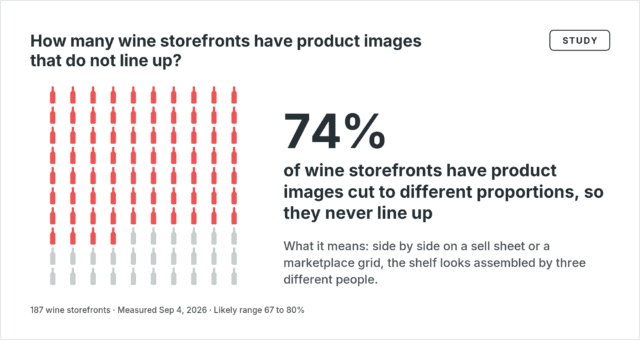
Outside the shop, those inconsistencies become more apparent. Three bottle images in three different proportions, placed side by side on a sell sheet, will not sit at the same height. A catalog that looks fine on a winery’s own website can fall apart the first time its files are used elsewhere.
Most wines get one photograph
Of all the wine listings we measured, 82% have exactly one photo. Roughly half of the wineries have exactly one photo for every wine they sell.
That one image does all the work. It shows customers the label, the bottle shape, and the color of the wine. But when that image shows only the front of the bottle, shoppers can’t see the back label, where they might find information about what the winery stands for, whether that’s organic farming, Salmon-Safe, or B Corp certification. Nor does it show where the wine might fit into someone’s life: a picnic blanket, a weeknight on the porch, or a table set for friends.
The expensive wine gets the same treatment
At 184 wineries, we split each catalog into thirds by price. Wines in the top third cost nearly three times as much as those in the bottom third. We compared the images at both ends of each catalog and found no measurable difference in resolution or in the number of images. The median resolution was identical, down to the pixel, in two-thirds of stores.
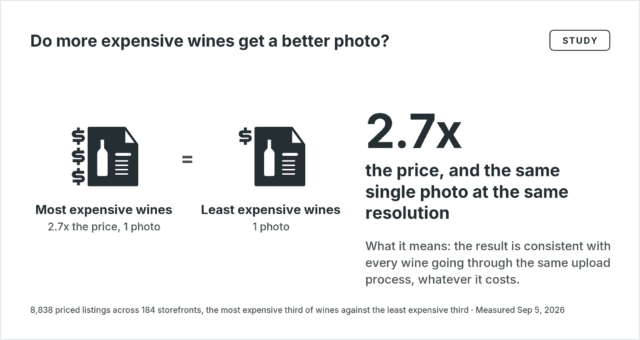
This finding is consistent with wineries using the same image-upload process across their catalogs, regardless of price. Matching resolution across a catalog creates consistency, and that part is fine. But a wine that costs nearly three times as much may need more images to communicate what justifies its higher price.
Three checks for your own catalog
- The thumbnail check. You ran this one at the top. Now note the outliers, the files that are tall and narrow while the rest are square, or vice versa. Those are the files that may not line up on the next sell sheet or distributor portal.
- The image count. Open your five best-selling wines on your shop page and count the images for each. Then note how many include a view of the back label. Wines with only one image and no back-label view are a good place to start.
- The price pair. Put your most expensive wine and your least expensive wine side by side, both on the shop page and in your image folder. Compare the number of images and the pixel dimensions of each file (on a Mac, select Get Info, then More Info; on Windows, right-click, select Properties, then the Details tab). Then consider whether the images themselves, their number, or their dimensions help communicate why one bottle commands a higher price.
Assembled, not photographed
Many wine catalogs were never photographed as a set. At the typical winery we measured, roughly half the catalog’s images were uploaded during a period of just a few weeks, a pattern consistent with a site rebuild or platform move. The rest arrived release by release. Each image made sense on the day it was uploaded, but perhaps nobody ever looked at the set as a whole.
None of the three checks requires more than your file browser and your shop, and together they can help you identify which files to address first.

Laurie Millotte is the founder of Outshinery, which produces photorealistic 3D product imagery for wine, beer, spirits, RTD, cider, and cannabis brands. Outshinery has produced imagery for more than 2,000 beverage brands and has imaged every entry in the Wine Business Monthly PACK Design Awards since 2021.